05 跨 domain 的 topic 與 QoS
目標:將 04 的 hello topic 登錄至介面合約(contract)contract.yaml,更名為 /robot/vision/hello 並選擇適當的 QoS,讓其他 domain(例如 main)能安全地訂閱。
時間:約 30 分鐘
背景
各小組之間只能透過 topic / service 溝通,不得直接相依其他小組的套件(ditx lint 的 boundaries 檢查會阻擋)。所有跨 domain 的 topic 皆登錄於 base/eurobot_common/contract.yaml,它是唯一的權威來源(single source of truth):
- 建置時自動產生 C++ / Python 常數:
contract.VISION_HELLO.name、contract.VISION_HELLO.qos()→ 程式中不需手動輸入 topic 名稱,拼寫錯誤或型別不一致會在建置階段就被發現 ditx test --integration與ditx contract live -r <robot>會將實際執行中的 topic 與合約比對ditx contract md會產生供人閱讀的 介面合約文件
如何選擇 QoS
contract.yaml 僅提供四種 profile。請從中擇一使用,不要自行組合參數:
| profile | 設定 | 適用情境 | 原因 |
|---|---|---|---|
sensor |
best_effort · volatile · keep_last 1 | 位置、雷達、偵測、heartbeat | 只需要最新的一筆資料;reliable 會為了重送舊資料而延遲新資料 |
state |
reliable · transient_local · keep_last 1 | 「目前狀態」類,例如 startup status | 較晚啟動的 node 連線後即可取得最後一筆資料 |
command |
reliable · volatile · keep_last 10 | 目標點、任務指令 | 不允許遺失 |
stream |
reliable · volatile · keep_last 10 | 給第三方套件讀的高頻資料,例如給 nav2 的 odometry | nav2 等套件以 reliable 訂閱,best_effort 的 publisher 不會被接收 |
QoS 不相容時將無法接收資料
reliable 的 subscriber 無法接收 best_effort publisher 的資料,transient_local 的 subscriber 也無法接收 volatile publisher 的資料。只要雙方都使用 contract.X.qos(),即可避免此問題。
action 與特殊 topic
- action:跨 domain 的 action(例如 main 請 navigation 執行
DockRobot)登錄在actions:區段,程式中使用contract.NAVIGATION_DOCK.name。contract_check會把 action 背後的隱藏 topic 視為已登錄。 - topic 可以加上以下旗標(預設皆為 false):
| 旗標 | 意思 | 例子 |
|---|---|---|
firmware: true |
名稱寫死在 micro-ROS 韌體裡,不受 /robot/... 命名規則限制;publisher 或 subscriber 可以寫 firmware |
/cmd_vel |
external: true |
名稱由機器人上 workspace 以外的系統決定(例如網頁儀表板),不受命名規則限制 | /game_score |
hardware: true |
沒有實體硬體(韌體板、相機、GPU)就不會有 publisher;sim 的整合測試(--require all)不要求它,--require everything 會要求 |
相機偵測結果 |
前置條件
- 完成 04 第一個套件
步驟
1. 在 contract.yaml 中登錄
在 base/eurobot_common/contract.yaml 的 topics: 下方加入:
  VISION_HELLO:
    name: /robot/vision/hello
    type: std_msgs/msg/String
    qos: sensor
    publisher: vision
    subscribers: [main]
    rate_hz: 1
    doc: Tutorial example, a greeting from the vision domain.
規則:key 一律使用全大寫;名稱格式為 /robot/<area>/<thing>(area 通常為負責的 domain);型別格式為 pkg/msg/Type。執行檢查:

2. 讓 node 改用合約常數
修改 hello_node.py 中的兩處:
from eurobot_common import contract
from eurobot_common.startup import StartupReporter
...
        topic = contract.VISION_HELLO
        self.pub = self.create_publisher(String, topic.name, topic.qos())
若 main 要訂閱,寫法相同(範例):
self.create_subscription(String, contract.VISION_HELLO.name, self.on_hello,
                         contract.VISION_HELLO.qos())
3. 重新建置共用介面與所有 domain
contract.yaml 位於 base/ 中,由所有小組共用。因此,你必須先在本機建置新的 base,再讓每個 domain 以它為基礎重新建置:

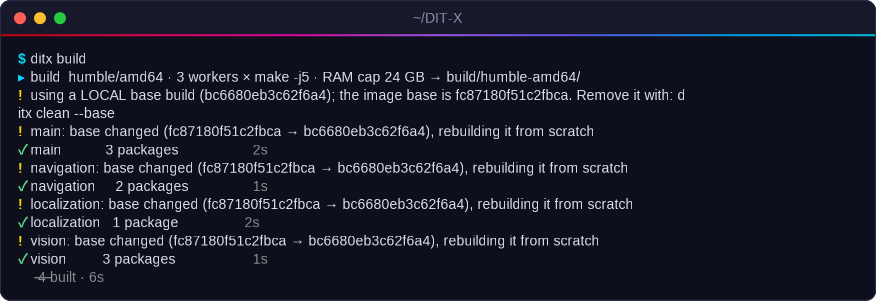
using a LOCAL base build:提醒你目前使用的是本機建置的 base,而非 image 中的版本base changed … rebuilding it from scratch:介面已變更,ditx會自動為每個 domain 重新執行 configure
4. 系統測試
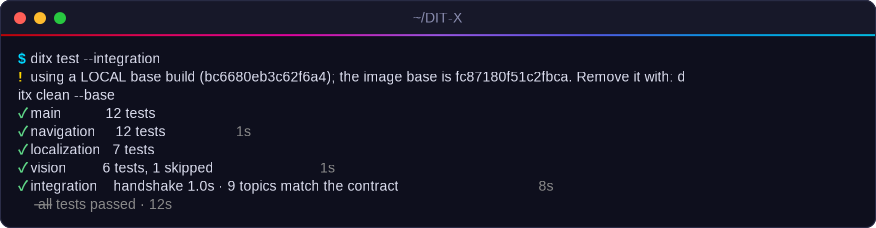
topic 數量從原本的 8 個增加為 9 個,新增的是 /robot/vision/hello。
若忘記重新建置 vision
整合測試會失敗,日誌中會出現 FAIL no publisher on /robot/vision/hello:合約已登錄新 topic,但執行的仍是舊程式(仍在發布 /vision/hello)。執行 ditx build 後再重新測試即可。
5. 更新文件並送出 PR
本次變更涉及兩個 repo:shell repo 中的 contract.yaml 與 docs/contract.md,以及 Eurobot-Vision 中的 node。修改共用介面的 PR 須經組長審查(CODEOWNERS),合併後 CI 會發布新的 base image。詳細流程請參閱 11 修改共用介面。
摘要
- 跨 domain 的 topic 一律登錄於
contract.yaml,程式中使用自動產生的常數 - QoS 從
sensor/state/command/stream中擇一使用 - 名稱不由我們決定的 topic 用
firmware/external標記,需要實體硬體才有 publisher 的用hardware標記 - 修改
base/即修改所有小組共用的介面,請依序執行ditx build --base→ditx build→ditx test --integration
下一步
06 模擬機器人:以與機器人相同的方式(Docker image + compose),在你的電腦上執行整套系統。